

Prerequisites
-
A SambaCloud API key
Get one by creating a SambaCloud account and generating an API key from the API Keys tab. -
Python 3.10 to 3.14.
camel-aidoes not support Python 3.9 or earlier, or Python 3.15 or later. -
Your API key exported as
SAMBA_API_KEY:
CAMEL-AI reads your key from
SAMBA_API_KEY, not SAMBANOVA_API_KEY. If you have followed another SambaNova integration guide, note that the variable name is different here.Installation and setup
-
Create a virtual environment
-
Confirm the environment uses a supported version
-
Install the required libraries. Quote
"camel-ai[all]~=0.2.90": zsh, the default shell on macOS, treats the square brackets as a filename pattern and fails withno matches foundbefore pip runs. The extra pulls a large dependency tree and can take several minutes, so allow time for it to finish. -
Verify the installation. This imports
ChatAgentrather than the top-level package, becauseimport camelsucceeds even when the agent API is broken.The command prints exactly this and exits without a traceback:
Quickstart
Before you write anything larger, confirm your setup end to end with a single chat completion. Save this asquickstart.py and run it with python quickstart.py:
SAMBA_API_KEY from your environment and returns a response in a few seconds. If it prints a reply, your environment and key are working, and any later failure is in your own code rather than your setup. Set model_type to any current model ID from SambaCloud models; Meta-Llama-3.3-70B-Instruct is a fast, inexpensive choice for a first run.
Coordinate two agents
CAMEL-AI is built for multi-agent work, so a single agent does not show much of it. The example below gives two agents different system messages and passes one’s output to the other: a planner drafts a plan, a reviewer critiques it, and the planner revises. EachChatAgent keeps its own conversation history, which is why the planner’s second turn already knows the plan it wrote.
Save this as two_agents.py and run it with python two_agents.py:
model object, so the script opens a single client and bills three completions. Give an agent its own ModelFactory.create() call when you want a different model per role.
Example notebook
You can explore an example notebook that demonstrates how to build a Customer Service Discord Bot using CAMEL-AI, models served by SambaCloud, Firecrawl, and Qdrant: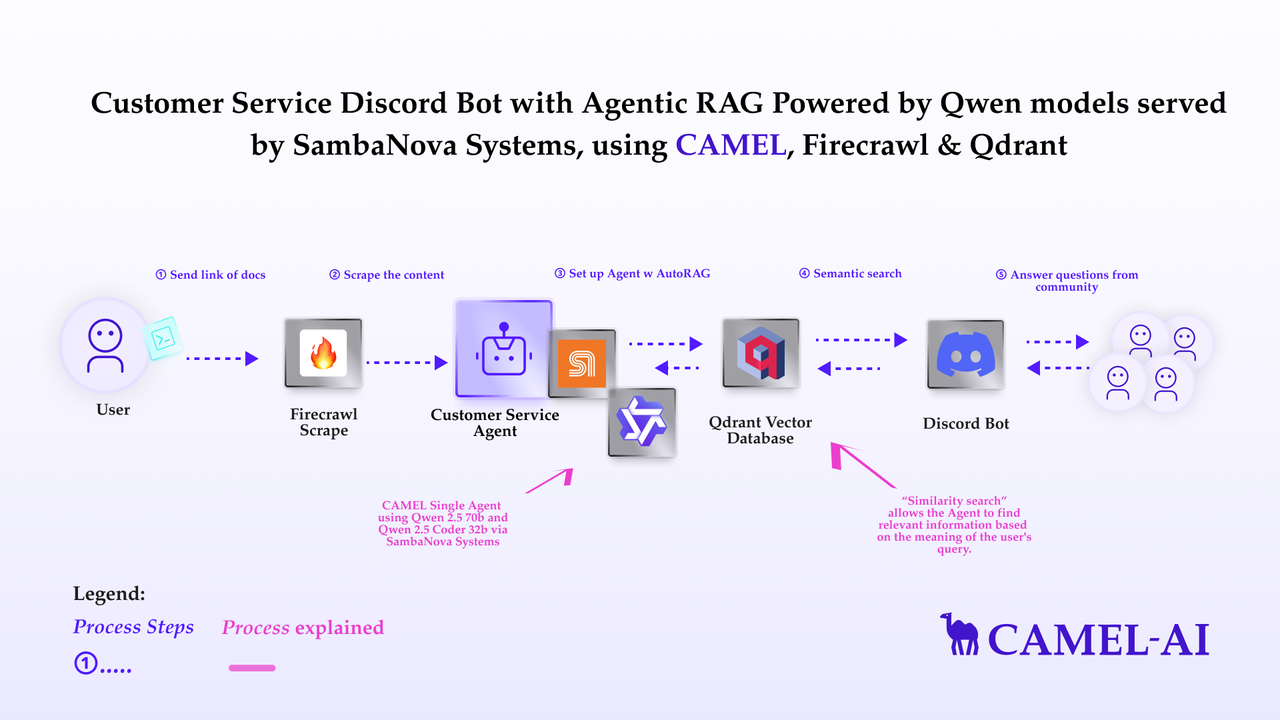
- A Firecrawl account for
FIRECRAWL_API_KEY, used to crawl the knowledge source. - A bot registered in the Discord Developer Portal for
DISCORD_BOT_TOKEN. - A GPU runtime. The notebook runs an open-source embedding model locally and suggests a GPU-backed Google Colab runtime (Tesla T4) for that step. You can substitute another embedding model supported by CAMEL-AI instead.
data/vectordb/.
Troubleshooting
zsh: no matches found: camel-ai[all]
zsh: no matches found: camel-ai[all]
zsh, the default shell on macOS, expands square brackets as a filename pattern, so the install command fails before pip runs. Quote the whole argument:
pip install "camel-ai[all]~=0.2.90". bash does not need the quotes, but they are harmless there.ImportError: cannot import name 'FastMCP' from 'mcp.server'
ImportError: cannot import name 'FastMCP' from 'mcp.server'
mcp 2.0.0 is installed. camel-ai requests mcp>=1.3.0 with no upper bound, but 2.0.0 removed FastMCP, which camel.toolkits imports. Every import under camel.agents fails as a result, including the notebook’s first cell. Note that import camel still succeeds, so this does not show up in a top-level import check. Fix it with pip install "mcp<2".ModuleNotFoundError: No module named 'camel'
ModuleNotFoundError: No module named 'camel'
The virtual environment is not active. Run
source .venv/bin/activate again, confirm the prompt shows (.venv), then re-run the install command. Verify with python -c "import camel; print('Camel-AI ready')".The install takes a long time or fails partway
The install takes a long time or fails partway
camel-ai[all] installs every optional dependency, which is a large download and can take several minutes on a slow connection. If it fails partway, install the base package first with pip install "camel-ai~=0.2.90", then add the extras. The example notebook needs the extras, so do not skip them permanently.ImportError or TypeError from camel after upgrading
ImportError or TypeError from camel after upgrading
A newer
camel-ai changed an API this page depends on. camel-ai is pre-1.0 and its public surface can move between releases. Reinstall the verified version with pip install "camel-ai[all]~=0.2.90", confirm what you have with pip show camel-ai, and check the CAMEL-AI documentation for the current signature before widening the bound.The notebook's model returns model_not_found
The notebook's model returns model_not_found
The example notebook sets
model_type="QwQ-32B", which SambaCloud deprecated on 6/25/2025 and no longer serves. Replace it with MiniMax-M3, or another current model ID from SambaCloud models. Note that the notebook’s retrieval corpus is itself about Qwen models, so you may want to adjust the prompts alongside the model.ValueError: DISCORD_BOT_TOKEN not found
ValueError: DISCORD_BOT_TOKEN not found
The linked notebook tells you to set
DISCORD_TOKEN, but CAMEL-AI’s code reads DISCORD_BOT_TOKEN. CAMEL-AI’s own docstring still refers to the older name, so the notebook’s instruction is stale upstream rather than an error on this page. Set DISCORD_BOT_TOKEN instead of DISCORD_TOKEN.ValueError: Missing or empty required API keys in environment variables: SAMBA_API_KEY
ValueError: Missing or empty required API keys in environment variables: SAMBA_API_KEY
Unlike most SambaNova integrations, CAMEL-AI requires
SAMBA_API_KEY. Setting SAMBANOVA_API_KEY has no effect here. CAMEL-AI raises this at ModelFactory.create() before any request is sent, so the traceback points at model setup rather than at the API call. Export SAMBA_API_KEY instead.The script hangs or the request times out
The script hangs or the request times out
CAMEL-AI defaults to a 180 second per-request timeout and retries failed calls three times. Lower it for faster feedback while you are iterating by passing
timeout=30 to ModelFactory.create(), or set MODEL_TIMEOUT in your environment. If every call times out, confirm the endpoint is reachable: curl -H "Authorization: Bearer $SAMBA_API_KEY" https://api.sambanova.ai/v1/models.Missing third-party credentials for the notebook
Missing third-party credentials for the notebook
The example notebook needs a Firecrawl API key, a Discord bot token, and a GPU runtime in addition to your SambaCloud key. See Example notebook for the full list and where to get each one. The quickstart and the two-agent example need none of them.
Additional resources
- CAMEL-AI documentation for the full framework reference.
- CAMEL-AI societies for the
RolePlayingandWorkforcepatterns that go beyond the two-agent example above. - camel-ai on GitHub to check the source for a signature or file an upstream issue.
- SambaCloud models for current model IDs and context lengths.