> ## Documentation Index
> Fetch the complete documentation index at: https://docs.sambanova.ai/docs/llms.txt
> Use this file to discover all available pages before exploring further.
# LangSmith integration guide
[LangSmith](https://www.langchain.com/langsmith) is LangChain's platform for tracing, debugging, and evaluating LLM applications. It records every model call as an explorable run tree, and it runs evaluations against datasets using an LLM-as-judge scorer.
In Python, SambaNova connects through the `langchain-sambanova` package. Because LangChain chat models are instrumented for LangSmith already, `ChatSambaNova` traces on its own with no client wrapper. In the LangSmith UI, where no client library is involved, SambaNova connects through its OpenAI-compatible endpoint.
This guide covers tracing a SambaNova call and running an evaluation where SambaNova serves as both the target model and the judge.
## Prerequisites
Before you begin, ensure you have:
* A [SambaCloud](https://cloud.sambanova.ai/?utm_source=langsmith\&utm_medium=external\&utm_campaign=cloud_signup) account and API key. See [API keys and URLs](/docs/en/get-started/api-keys-urls).
* A [LangSmith](https://smith.langchain.com/) account and API key. Create one in LangSmith under **Settings → API Keys**. LangSmith keys begin with `lsv2_`.
* Python 3.10 or later. Version 1.x of `langchain-sambanova` requires Python 3.10 or later. On Python 3.9, pip reports that no matching distribution was found.
## Setup
```bash theme={}
pip install "langchain-sambanova>=1.1,<2" "langsmith>=0.14" pydantic
```
Keep the version bounds. Release 1.0.0 removed the `ChatSambaNovaCloud` and
`ChatSambaStudio` classes, so this package does ship breaking major releases.
`pydantic` arrives as a dependency of `langchain-core`, but the evaluation
example imports it directly, so install it explicitly.
Confirm what you installed:
```bash theme={}
python -c "import langchain_sambanova, langsmith; print(langchain_sambanova.__version__, langsmith.__version__)"
```
You should see an output similar to the one below.
```text theme={}
# Expected output
1.1.1 0.14.8
```
```bash theme={}
export SAMBANOVA_API_KEY="your-sambanova-key"
export LANGSMITH_API_KEY="your-langsmith-key"
export LANGSMITH_TRACING=true
export LANGSMITH_PROJECT="sambanova-demo"
```
`LANGSMITH_TRACING` must be set to `true`. Without it the SDK runs your code
normally but sends nothing to LangSmith, so the project stays empty and no
error is raised.
`ChatSambaNova` reads `SAMBANOVA_API_KEY` on its own and defaults to
`https://api.sambanova.ai/v1`, so no base URL is needed. SambaStack users also
set `SAMBANOVA_API_BASE` to their deployment URL, or pass `base_url` to
`ChatSambaNova`.
## Trace a SambaNova call
`ChatSambaNova` is a LangChain chat model, so LangSmith instruments it automatically. You do not need a client wrapper. Decorate your own function with `@traceable` to group the model call under a named parent run.
```python theme={}
from langsmith import traceable
from langchain_sambanova import ChatSambaNova
llm = ChatSambaNova(model="MiniMax-M3", max_tokens=2000)
@traceable(name="sambanova-capabilities-check")
def ask(question: str) -> str:
return llm.invoke(question).content
print(ask("What can you do?"))
```
The script prints the model's reply. The exact wording varies between runs.
```text theme={}
# Expected output
I can answer questions, provide explanations, generate text, and help with a wide range of tasks.
```
Now open your project at [smith.langchain.com](https://smith.langchain.com/) and select `sambanova-demo`. LangSmith creates the project on the first trace, so it appears without you having to add it. You see two runs:
| Run | Type | What it holds |
| :- | :- | :- |
| `sambanova-capabilities-check` | chain | The parent run, named by `@traceable` |
| `ChatSambaNova` | llm | The model call, with the prompt, the completion, and the token counts |
If the project is empty, see [The LangSmith project is created but contains no runs](#troubleshooting).
Pass any model ID that SambaCloud currently serves. The catalog changes over time,
so confirm the ID against [SambaCloud models](/docs/en/models/sambacloud-models) or list
it directly with `curl https://api.sambanova.ai/v1/models`. If you use the model as
an evaluation judge, it must also support function calling. See
[Function calling](/docs/en/features/function-calling).
Guides written against a generic OpenAI client wrap it in `wrap_openai`. That
step does not apply here. Wrapping is what gives an unaffiliated SDK a run tree;
LangChain models already emit one. Using `ChatSambaNova` also labels the child
run `ChatSambaNova` rather than the generic `ChatOpenAI`, so SambaNova calls stay
identifiable in the trace view.
## Run an evaluation
`Client.evaluate` runs a target function over a dataset and scores each result with the evaluators you supply. The example below uses `MiniMax-M3` for both roles, and grades correctness through a forced tool call so the judge returns a structured verdict instead of prose.
```python theme={}
from langsmith import Client
from langchain_sambanova import ChatSambaNova
from pydantic import BaseModel, Field
ls = Client()
MODEL = "MiniMax-M3"
DATASET = "sambanova-qa"
llm = ChatSambaNova(model=MODEL, max_tokens=2000)
if not ls.has_dataset(dataset_name=DATASET):
dataset = ls.create_dataset(DATASET)
ls.create_examples(dataset_id=dataset.id, examples=[
{"inputs": {"question": "What is the capital of France?"},
"outputs": {"answer": "Paris"}},
{"inputs": {"question": "What is 2+2?"},
"outputs": {"answer": "4"}},
{"inputs": {"question": "Who wrote Hamlet?"},
"outputs": {"answer": "William Shakespeare"}},
])
def target(inputs: dict) -> dict:
return {"answer": llm.invoke(inputs["question"]).content}
class Grade(BaseModel):
"""Grade a submitted answer against a reference answer."""
correct: bool = Field(description="Whether the submitted answer is factually correct")
reasoning: str = Field(description="Brief justification for the verdict")
judge = ChatSambaNova(model=MODEL, max_tokens=1000).bind_tools(
[Grade], tool_choice="required"
)
def correctness(outputs: dict, reference_outputs: dict) -> dict:
result = judge.invoke(
f"Reference answer: {reference_outputs['answer']}\n"
f"Submitted answer: {outputs['answer']}\n"
"Is the submitted answer factually correct?"
)
args = result.tool_calls[0]["args"]
return {"key": "correctness", "score": bool(args["correct"]),
"comment": args["reasoning"]}
results = ls.evaluate(
target,
data=DATASET,
evaluators=[correctness],
experiment_prefix="sambanova-minimax-m3",
max_concurrency=2,
)
print(results.experiment_name)
```
The run prints a comparison URL and the experiment name. The identifiers in the URL are specific to your workspace.
```text theme={}
# Expected output
View the evaluation results for experiment: 'sambanova-minimax-m3-adb0ee8b' at:
https://smith.langchain.com/o//datasets//compare?selectedSessions=
sambanova-minimax-m3-adb0ee8b
```
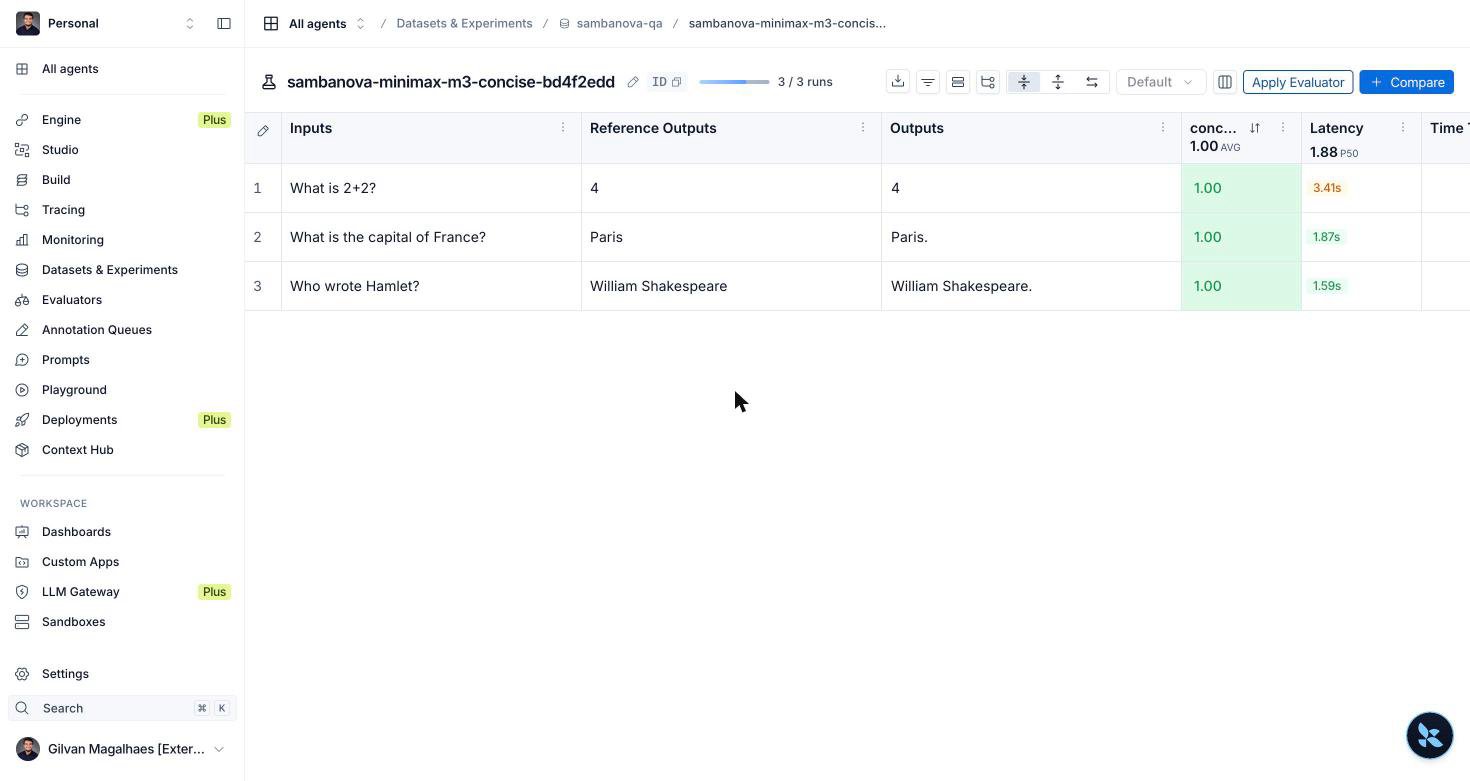
Open that URL. Each row carries a `correctness` score sourced from the judge's tool call, with its reasoning as a comment, and the column header shows the average across the experiment. A healthy first run scores 3 of 3 with no errors.
Each row costs two model calls, one for `target` and one for the judge, so this
three-row dataset issues six calls per run. `max_concurrency=2` caps how many run
at once. Raise it to finish larger datasets faster, but see
[Rate limits](/docs/en/models/rate-limits) first, since the target and judge both count
against the same quota.
`tool_choice="required"` is what makes the judge reliable. It forces the model to
emit a structured tool call rather than a prose verdict your code then has to parse.
`bind_tools` derives the JSON Schema from the `Grade` model, so the docstring and
each `Field` description are what tell the model how to grade. Read the verdict from
`result.tool_calls[0]["args"]`, which LangChain has already parsed into a dict, so no
`json.loads` is needed. `MiniMax-M3` supports function calling. See
[Function calling](/docs/en/features/function-calling) for the full list of supported
models, and confirm your chosen model appears there before using it as a judge.
## Use SambaNova in the Playground
The Playground lets you test prompts against SambaNova without writing code.
The Playground and the managed evaluator below are LangSmith UI surfaces. They
call the model from LangSmith's own servers, so no client library is involved and
`langchain-sambanova` does not apply. Connect them with the **OpenAI Compatible
Endpoint** provider instead, as shown below. The Python sections above use
`ChatSambaNova`.
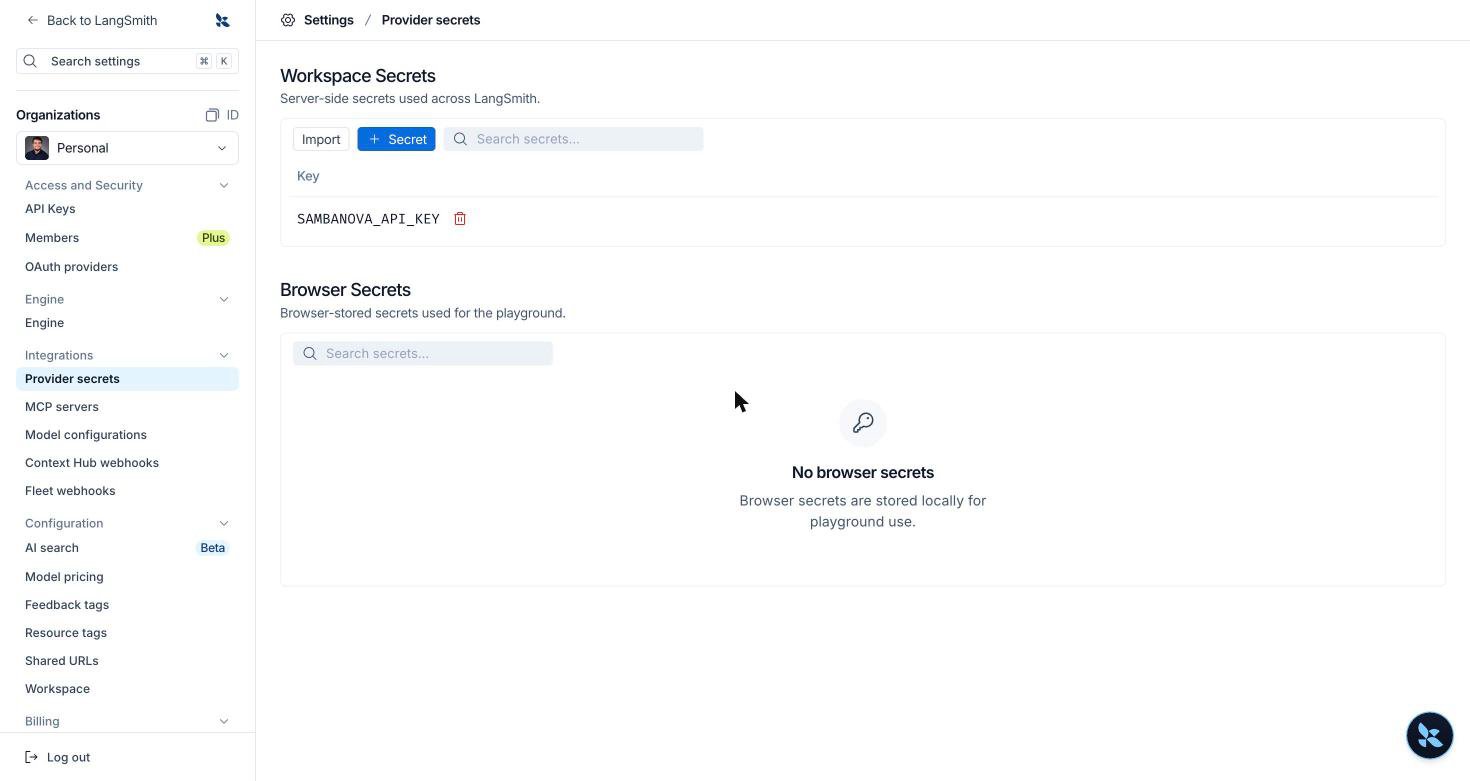
Go to **Settings → Provider secrets**. Under **Workspace Secrets**, select
**Secret**, then add `SAMBANOVA_API_KEY` as the key and paste your SambaCloud
key as the value.
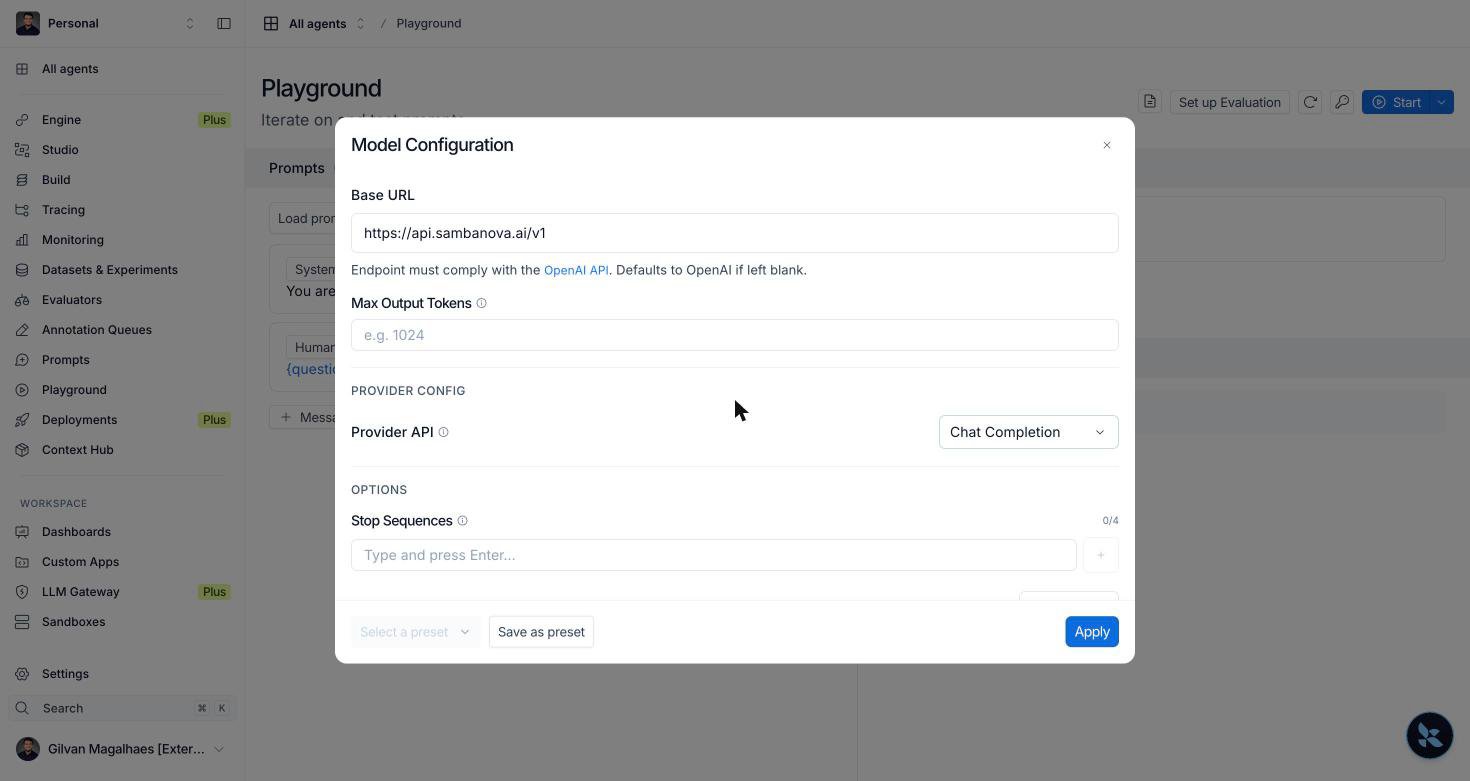
 Open the **Playground**, select the model name in the prompt toolbar to open
**Model Configuration**, and set the following:
| Field | Value |
| :- | :- |
| Provider | `OpenAI Compatible Endpoint` |
| Model | `MiniMax-M3` |
| API Key Name | `SAMBANOVA_API_KEY` |
| Provider Name | `sambanova` |
| Base URL | `https://api.sambanova.ai/v1` |
| Provider API | `Chat Completion` |
**Provider API** defaults to `Responses (Recommended)`. Change it to
`Chat Completion`. SambaNova serves the OpenAI-compatible chat completions API,
so leaving the default selected points the Playground at an endpoint shape
SambaNova does not implement.
Enter the Base URL as `https://api.sambanova.ai/v1`. LangSmith appends
`/chat/completions` for you, so including it yields a malformed request path.
If the model you want is not in the dropdown, type its ID and select it.
**Provider Name** is optional and is used to look up model pricing.
Open the **Playground**, select the model name in the prompt toolbar to open
**Model Configuration**, and set the following:
| Field | Value |
| :- | :- |
| Provider | `OpenAI Compatible Endpoint` |
| Model | `MiniMax-M3` |
| API Key Name | `SAMBANOVA_API_KEY` |
| Provider Name | `sambanova` |
| Base URL | `https://api.sambanova.ai/v1` |
| Provider API | `Chat Completion` |
**Provider API** defaults to `Responses (Recommended)`. Change it to
`Chat Completion`. SambaNova serves the OpenAI-compatible chat completions API,
so leaving the default selected points the Playground at an endpoint shape
SambaNova does not implement.
Enter the Base URL as `https://api.sambanova.ai/v1`. LangSmith appends
`/chat/completions` for you, so including it yields a malformed request path.
If the model you want is not in the dropdown, type its ID and select it.
**Provider Name** is optional and is used to look up model pricing.
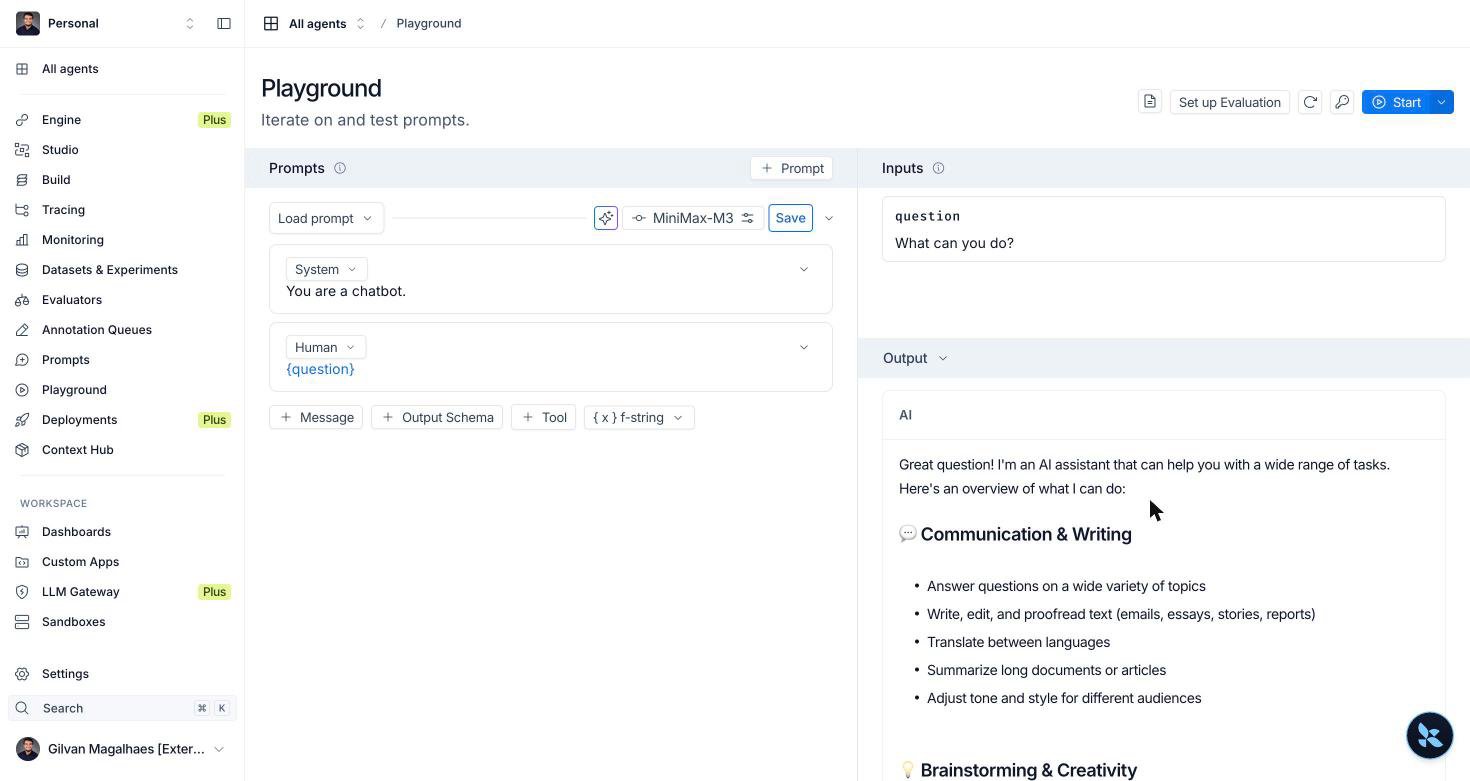
 Select **Apply**, enter a value for your prompt variable, then select **Start**.
The response streams into the **Output** pane, and the run is traced automatically.
Select **Apply**, enter a value for your prompt variable, then select **Start**.
The response streams into the **Output** pane, and the run is traced automatically.
 ## Score runs with a managed evaluator
LangSmith can also run an LLM-as-judge evaluator server side, with no evaluator
code in your project. The judge itself runs on SambaNova.
Go to **Evaluators** and select **Evaluator**. In the **Configure Evaluator**
panel, choose **LLM-as-a-Judge Evaluator** under **Create from scratch**, then
give it a name. The panel also offers prebuilt templates such as PII Leakage and
Toxicity, which are not used here.
Under **Feedback Configuration**, set the feedback key, a description of your
criteria, and a response format such as **Boolean**.
Select the model name to open **Model Configuration**, then apply the same
settings used for the Playground: provider `OpenAI Compatible Endpoint`, model
`MiniMax-M3`, API key name `SAMBANOVA_API_KEY`, base URL
`https://api.sambanova.ai/v1`, and Provider API `Chat Completion`. Select
**Apply**, then **Save**.
Open your dataset, select **Evaluator**, choose the evaluator you saved, then
select **Save**. It now scores every new experiment on that dataset
automatically.
You can skip this step by setting **Projects & Datasets → Source** to your
dataset while creating the evaluator. The result is the same attachment.
Run any experiment against the dataset. Your evaluator's feedback key appears
as a scored column, with a per-row value and an average across the experiment.
## Score runs with a managed evaluator
LangSmith can also run an LLM-as-judge evaluator server side, with no evaluator
code in your project. The judge itself runs on SambaNova.
Go to **Evaluators** and select **Evaluator**. In the **Configure Evaluator**
panel, choose **LLM-as-a-Judge Evaluator** under **Create from scratch**, then
give it a name. The panel also offers prebuilt templates such as PII Leakage and
Toxicity, which are not used here.
Under **Feedback Configuration**, set the feedback key, a description of your
criteria, and a response format such as **Boolean**.
Select the model name to open **Model Configuration**, then apply the same
settings used for the Playground: provider `OpenAI Compatible Endpoint`, model
`MiniMax-M3`, API key name `SAMBANOVA_API_KEY`, base URL
`https://api.sambanova.ai/v1`, and Provider API `Chat Completion`. Select
**Apply**, then **Save**.
Open your dataset, select **Evaluator**, choose the evaluator you saved, then
select **Save**. It now scores every new experiment on that dataset
automatically.
You can skip this step by setting **Projects & Datasets → Source** to your
dataset while creating the evaluator. The result is the same attachment.
Run any experiment against the dataset. Your evaluator's feedback key appears
as a scored column, with a per-row value and an average across the experiment.
 A managed evaluator is not part of your `evaluate` call. It runs asynchronously
after the experiment finishes, so scores appear a minute or two later rather than
immediately. Use an evaluator function in your own code when you need the score
returned inline.
## Troubleshooting
Version 1.x requires Python 3.10 or later. On Python 3.9, pip reports
`No matching distribution found for langchain-sambanova` rather than naming the
version as the cause. Check your interpreter with `python -V` and install into a
3.10 or later environment.
* Confirm `LANGSMITH_TRACING` is set to `true`. When it is unset, tracing is silently disabled and no error appears.
* Tracing flushes in the background. A short script may exit before the upload finishes, so allow a few seconds, then refresh the project.
* Verify the key is exported: `echo "${SAMBANOVA_API_KEY:0:10}..."`
* An invalid key returns HTTP 401 with `"code": "invalid_api_key"`. Regenerate it in the [SambaCloud portal](https://cloud.sambanova.ai/apis?utm_source=langsmith\&utm_medium=external\&utm_campaign=cloud_signup).
* `ChatSambaNova` defaults to `https://api.sambanova.ai/v1`, so no base URL is needed. If you target SambaStack, confirm `SAMBANOVA_API_BASE` points at your deployment.
You exceeded the requests allowed for your tier. An evaluation is the likeliest
place to hit this, because every row issues two calls, one for the target and one
for the judge, and `max_concurrency` multiplies them.
* Lower `max_concurrency`, or back off and retry.
* See [Rate limits](/docs/en/models/rate-limits) for the limits that apply to you.
`MiniMax-M3` is a reasoning model. It returns its reasoning in a separate
`reasoning` field and the final answer in `content`. If `max_tokens` is too low,
generation is cut off during reasoning, before any answer tokens are produced, so
`content` comes back empty (`""`) and `finish_reason` is `length`.
* Check `finish_reason`. A value of `length` means the limit was reached, not that the model answered badly.
* Raise `max_tokens`. In testing, short factual questions like the ones in this guide's dataset used well under 100 tokens total (reasoning plus answer), but leave headroom for longer or more complex prompts.
* This matters most for evaluation targets, where an empty answer is scored as if it were the model's real response.
* Managed evaluators run on a schedule after the experiment completes. Allow a minute or two, then refresh the experiment.
* Confirm the evaluator is attached to the dataset itself. Saving an evaluator under **Evaluators** does not attach it to anything on its own.
* Confirm its Provider API is `Chat Completion`, the same requirement as the Playground.
This applies to the Playground and managed evaluators, not to `ChatSambaNova`.
LangSmith appends `/chat/completions` to the base URL you provide. Enter
`https://api.sambanova.ai/v1` and do not include the `/chat/completions` suffix.
## Related
* [LangChain integration guide](/docs/en/integrations/langchain)
* [LangGraph integration guide](/docs/en/integrations/langgraph)
A managed evaluator is not part of your `evaluate` call. It runs asynchronously
after the experiment finishes, so scores appear a minute or two later rather than
immediately. Use an evaluator function in your own code when you need the score
returned inline.
## Troubleshooting
Version 1.x requires Python 3.10 or later. On Python 3.9, pip reports
`No matching distribution found for langchain-sambanova` rather than naming the
version as the cause. Check your interpreter with `python -V` and install into a
3.10 or later environment.
* Confirm `LANGSMITH_TRACING` is set to `true`. When it is unset, tracing is silently disabled and no error appears.
* Tracing flushes in the background. A short script may exit before the upload finishes, so allow a few seconds, then refresh the project.
* Verify the key is exported: `echo "${SAMBANOVA_API_KEY:0:10}..."`
* An invalid key returns HTTP 401 with `"code": "invalid_api_key"`. Regenerate it in the [SambaCloud portal](https://cloud.sambanova.ai/apis?utm_source=langsmith\&utm_medium=external\&utm_campaign=cloud_signup).
* `ChatSambaNova` defaults to `https://api.sambanova.ai/v1`, so no base URL is needed. If you target SambaStack, confirm `SAMBANOVA_API_BASE` points at your deployment.
You exceeded the requests allowed for your tier. An evaluation is the likeliest
place to hit this, because every row issues two calls, one for the target and one
for the judge, and `max_concurrency` multiplies them.
* Lower `max_concurrency`, or back off and retry.
* See [Rate limits](/docs/en/models/rate-limits) for the limits that apply to you.
`MiniMax-M3` is a reasoning model. It returns its reasoning in a separate
`reasoning` field and the final answer in `content`. If `max_tokens` is too low,
generation is cut off during reasoning, before any answer tokens are produced, so
`content` comes back empty (`""`) and `finish_reason` is `length`.
* Check `finish_reason`. A value of `length` means the limit was reached, not that the model answered badly.
* Raise `max_tokens`. In testing, short factual questions like the ones in this guide's dataset used well under 100 tokens total (reasoning plus answer), but leave headroom for longer or more complex prompts.
* This matters most for evaluation targets, where an empty answer is scored as if it were the model's real response.
* Managed evaluators run on a schedule after the experiment completes. Allow a minute or two, then refresh the experiment.
* Confirm the evaluator is attached to the dataset itself. Saving an evaluator under **Evaluators** does not attach it to anything on its own.
* Confirm its Provider API is `Chat Completion`, the same requirement as the Playground.
This applies to the Playground and managed evaluators, not to `ChatSambaNova`.
LangSmith appends `/chat/completions` to the base URL you provide. Enter
`https://api.sambanova.ai/v1` and do not include the `/chat/completions` suffix.
## Related
* [LangChain integration guide](/docs/en/integrations/langchain)
* [LangGraph integration guide](/docs/en/integrations/langgraph)